Added a weird stippling. Its kinda funny how hard this is to look like the “old” way. On the Amiga you ran a blitter co routine (yes they had one of the first gpus) and it was kinda trivial to ‘step over’ a pixel when rendering 
Something to be said for pixel buffers imho.
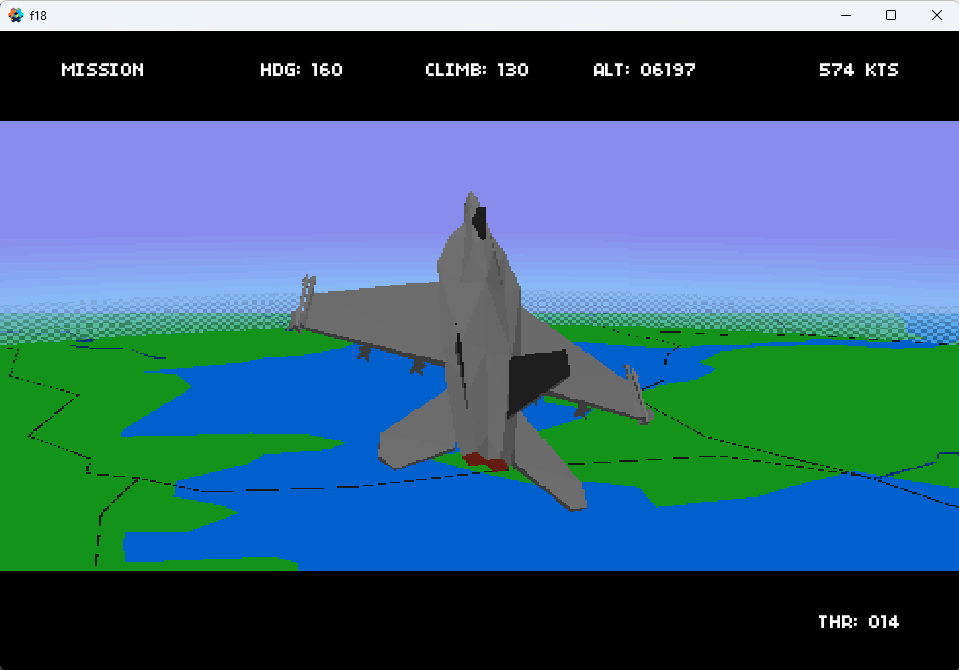
Heres the shader as well. There are some specific constants in there for my game, read the comments
varying highp vec4 var_position;
varying mediump vec3 var_normal;
varying mediump vec2 var_texcoord0;
varying mediump vec4 var_light;

// Notes:
//  This is mapped onto a 3DD cylinder made in Blender. It is 2.0 high and the texture is unwrapped so
//   that the uv mapping is vertical for the height of the cylinder. The cylinder also has had its faces
//   flipped becase you will be inside it :)
//  The var_position is the only weird one here. In the vp I use:
//    var_position = (mtx_proj * p).xyz;
//    otherwise the vp is pretty std model vp.

// This is setup from the render_script with:
// x = resolution width (in my case its a RT width, but you can normally use screen/window)
// y = resolution height
// z = aspect (just divide the x by the y) I dont use it here, but I do for others :)
// w = altitude of the camera. This is needed because the plane can move up almost as far as the farplane which is 50km.
uniform mediump vec4 params;

// Colors for the top and middle of the atmospehere. Below horizonColor black is drawn
const vec4 peakColor = vec4(0.5372549, 0.545098039, 0.929411764, 1.0);
const vec4 horizonColor = vec4(0.52941176, 0.843137254, 0.98823529, 1.0);
const vec4 black = vec4(0.0,0.0,0.0, 1.0);

highp float pi = 3.141592653589793;

// These are used in pixel calcs. Because my render texture resolution can change this means
// these need to be dynamic.
mediump float pixelBandX = 1.0 / params.x;
mediump float pixelBandY = 1.0 / params.y;

// How wide to apply a blend for the hiorizon
mediump float colorBand = 1.0 / 256.0;
// How wide to apply the dithering band on the horizon
mediump float colorBandLow = (1.0 / 256.0) * 5;

// Fudge factor to get it looking ok.
const highp float factor = 0.75;

// These are 'steppers' so that the position of the pixel can be stepped. This isnt overly
// accurate because we are doing this in projected screen coords. Theres probably a better way I suspect.
highp float RESX = (params.x * factor);
highp float RESY = (params.y * factor);
highp float RESHX = (RESX * 0.5);
highp float RESHY = (RESY * 0.5);

// This creates the horizon stipple effect
vec4 stipple( vec4 color, vec2 uv, float level )
{
    float xcoord = uv.x;

    float valy = mod(uv.y, RESY);
    if(valy > RESHY)
        xcoord += RESHX;

    float valx = mod(xcoord, RESX);
    if(valx > RESHX)
        return color * level;
    else
        return vec4(color.xyz, level);
}

void main()
{
    // Yes horrible. Divide by our maximum alt * 2 - because this is mapped onto a cylinder
    float alt = params.w / 90000;

    // Work out where the horizon is using uv coord
    highp float f = floor( (var_texcoord0.y + alt) / colorBand) * colorBand;
    if(f < 0.5) {
        gl_FragColor = black;
    }
    else if(f >= 0.5 && f <= 0.5 + colorBandLow) {
        float level = ((f-0.5)/colorBandLow ) * 0.5 + 0.5;
        gl_FragColor = stipple( mix(horizonColor, peakColor, (f-0.5)/0.05), var_position.xy, level);
    }
    else if(f > 0.5 + colorBandLow && f < 0.55) {
        gl_FragColor = mix(horizonColor, peakColor, (f-0.5)/0.05);
    }
    else if(f >= 0.55){
        gl_FragColor = peakColor;
    }
}