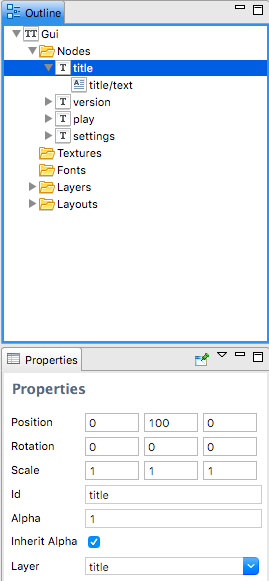
When using templates, how do I ensure I’m not breaking batch rendering? Should I create the layers in the template GUI file, or in the parent GUI file? Should I set the layer in the template GUI file, or override it in the parent GUI file? Should the template node itself be assigned to a layer?
Is there a way to verify how many drawcalls the engine has to make to render my GUI?
I always have the same set of layers defined in my templates and in my GUI scenes. You can see the total number of draw calls made by the engine in the profiler. Put the GUI in a separate collection and load it as the main collection to isolate the draw calls count to only your GUI.
The only thing that breaks batches is the gpu state (vertex format, texture, material, blend-mode, shader constants, clipping, etc.). Layers is just a means to control the render-order of different nodes, both for visual appearance (like keeping things on top) but also to minimise batch-breaks of course. In general, box/pie nodes will share the same gpu state (unless you change the gpu state as described above of course) and text nodes will have a different state (in fact they can’t share a batch since they have different vertex formats, texture, material). Note that this is independent of which templates, layouts, layers, etc they originate from. So a simple scene might be:
Box1
Text1
Box2
Text2
If you then only assign the texts to a layer, the draw order will change from [Box1, Text1, Box2, Text2] to [Box1, Box2, Text1, Text2] thereby changing draw calls from 4 to 2. Templates are baked out into the including scene, so as far as the engine is concerned, templates do not exist at all. It is only a convenience while editing/structuring stuff.
If templates are just an editor construct, what does it mean to assign a template to a layer? If I’m understanding you correctly, that node doesn’t really exist at runtime…
Hmm, good question. It might be an oversight that you are able to do this. @Andreas_Tadic, you created the template system. Would you care to shed some light on this?
If you assign a node to a layer, that will implicitly assign any unassigned sub-nodes of that node to the same layer. The same thing applies to a template nodes. So:
Bumping the topic up, just because I wanted to show how important batching in GUI is:
I had my GUI prepared without not even a single layer - positioning nodes in the tree does the job perfectly and I managed to maintain the draw order of all gui elements properly. I was also using few different node types (box, pie, text). In GUI I had one texture and one font, but it was packed with templates - and each of them had at least one texture and font, many times - few of them. I wasn’t aware how much it is impacting the performance until @Pkeod hinted this on Discord.
In that state I was at total of ~77-80 Draw Calls.
I commented out a part responsible for drawing GUI from render script and reloaded the game:
I was at ~20 Draw Calls! So GUI was taking almost 60 Draw Calls.
I decided to take care about layers in GUI - adding just layers to all nodes reduced the Draw Calls for GUI by 15!
Going further I packed all the different images used in all GUI and templates into one atlas and removed unused stuff - this reduced it further by few Draw Calls.
In the end I sorted nodes by types - assigining to each type a proper layer:
Back layer - only box nodes (backgrounds, buttons, elements etc)
Middle layer - pie nodes
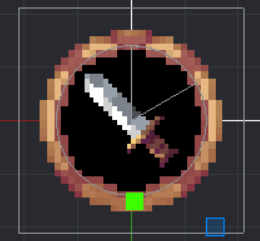
Front layer - additional layer for Box nodes, because some of my pie nodes should be covered b y some frames, like shown in the end*
Text layer - for all the text nodes, as they are on top of everything
This all reduced Draw Calls for GUI to ~20! This is still much, but it’s reduced by over 70% and that’s something! And in total it’s ~36 Draw Calls
Just bear in mind, that GUI is very tricky when it comes to batching
*Pie node (black backround) from Middle layer is covered by Box Node with brown “frame” texture in Front layer: