I don’t think you need a module for this, just keep it as a regular script. You can use multiple script components on the same object and expose some variables as script properties so the base behavior script is customizable. For example, in your “module code”, you can add go.property("speed", 30) and then you can set that to whatever you want for each mob, in the editor. Or you can set it from another script with something like, go.set("#mobModule, "speed", 150). You can do the same thing with the HP. Make it a property on the “module” component but calculate the initial value and set it from the “mob” component.
You could use a Lua module for some of this, but I think it would just make things more complicated for no particular reason.
[Edit] Here’s how I might modify your script to be more usable for different enemies (all in one script).
(I wasn’t quite sure what you were doing with the “hpIncrement”, so I just put in something simple)
[details=“Module” (click to show)]
go.property("speed", 30)
go.property("hpMin", 1000)
go.property("hpMax", 1700)
go.property("money", 10)


function init(self)
	self.direction = 1 -- -1 - left, 1 - right
	self.id = go.get_id()
	self.hp = math.random(self.hpMin, self.hpMax)
end

function update(self, dt)
	local p = go.get_position()
	-- apply the speed
	p.x = p.x + self.speed * dt * self.direction
	go.set_position(p)
	if p.x == 204 or p.x == 39 then
		p.y = p.y - 56
		self.direction = self.direction*-1
		if self.direction == -1 then
			sprite.set_hflip("#mob1", true)
			sprite.set_hflip("#mob2", true)
		else
			sprite.set_hflip("#mob1", false)
			sprite.set_hflip("#mob2", false)
		end
		go.set_position(p)
	end
	--arrive to Reactor
	if p.x == 192 and p.y == 25 then
		msg.post("/reactor#behavior_TurretReactor", "do_damageReactor")
		go.delete()
	end
	--draw HP
	msg.post("@render:", "draw_text", {text = "" .. self.hp, position = vmath.vector3(p.x - 10, p.y+30, p.z)})
	--delete mobs if 0 hp
	if self.hp <= 0 then
		money = money + self.money
		go.delete()
	end
end

function on_message(self, message_id, message, sender)
	--damage from laser
	if message_id == hash("do_damage") then
		self.hp = self.hp - message.damage
		--msg.post("@render:", "draw_text", {text = "dmg" .. message.damage, position = vmath.vector3(p.x - 10, p.y+30, p.z)})
	end
end
[/details]
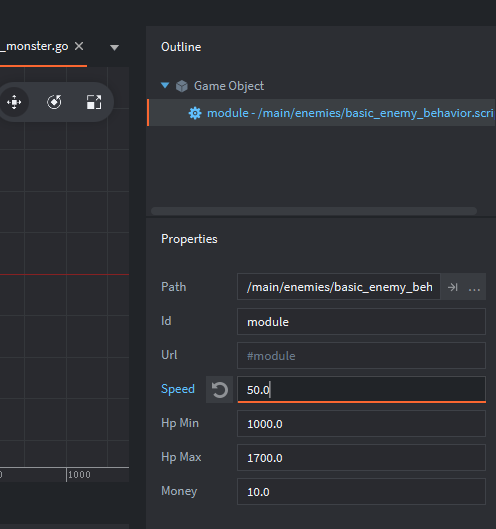
And that will give you this in the editor. You can make a different GO for each enemy with totally different settings on the script.
[Edit 2] It looks like you’re using some global variables. That’s the part that I would replace with a module. Global variables are just way too easy to lose track of and cause conflicts and hard-to-find bugs. If you put global stuff in a module instead then you know exactly where it is and where it comes from, and you can even use the “referencing file” feature in Editor 2 to see what scripts are using the module. (such an awesome feature.)
So, modules are just dictionary-style(key = value) tables with stuff in them. You define them like this:
local M = {} -- define a table for the module contents.
-- calling it 'M' is just an easy convention

M.money = 0 -- define some variable in the module table

function M.myFunc(stuff) -- define a function of the module
    stuff = stuff * 10
    return stuff
end

return M -- give the table to scripts that `require` it
Then any script that wants to access the contents of the module just has to write:
local myMod = require "main.module_filename"
-- assuming the module file is "module_filename.lua" in the "main" folder
You can set it’s local name to whatever you want. Generally you want to use the same name in every script that uses it. And then you just access the module like any other key-value table.
function init(self)
    self.money = myMod.myFunc(self.money) -- multiply my money by 10
    myMod.money = myMod.money + self.money -- add my money to the 'global' money pool
    print(myMod.money)
end