3D Model Material Property misleading

Describe the bug (REQUIRED)
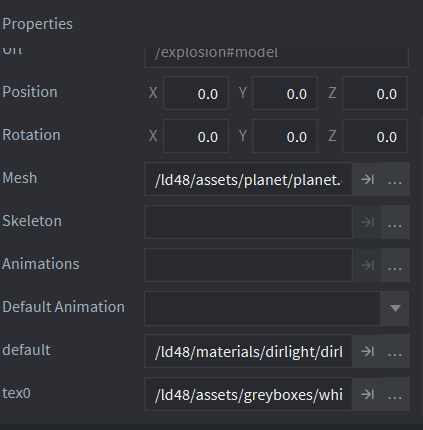
The Material property of a 3D model in the properties displays misleading property name.

To Reproduce (REQUIRED)
Steps to reproduce the behavior:

  1. Open a scene.
  2. Select a scene model.
  3. The model Material attribute displays default as the property name.

Expected behaviour (REQUIRED)
A clear and concise description of what you expected to happen.

Defold version (REQUIRED):

  • Version [1.9.3]

Platforms (REQUIRED):

  • OS: [Windows 11]

Screenshots (OPTIONAL):

The documentation is also not consistent with what the editor shows.

Docs ( 3D models in Defold )

The editor

So it looks like the order of properties has changed and that material accidentally says “default”.

In more recent versions of Defold we identify all of the meshes in the model and let the developer assign different materials to each. The default probably comes from the model itself, or possible if it is unnamed.

We need to update the documentation though. Ping @Pawel

2 Likes

Yes, all the materials defined in the source file are listed there with their names as in the file (e.g. In gltf files you can open it in text editor and search for material, there will be at least one material with name e.g. “default”).

If some file will have more than one files, then for all of them, you will see a property with its name and you will be able to assign a material (and then corresponding to the material textures).

The documentation though should be updated, but screenshot will always show a name from a currently used resource file, so sometimes it still might be misleading, if you use a different file, but we can add an explanation :wink:
1 Like

Maybe it could show a text like “Material: {material_name}” instead of just the name. So the user understand it is some material property in the mesh…

2 Likes